How to Use the MTF Trend Dashboard Indicator on TradingView in Forex Trading
Discover Market Direction Across Multiple Timeframes and Make More Informed Forex Trading Decisions
Are you tired of entering a forex trade only to discover that the larger market trend is moving against you?
One of the biggest challenges in forex trading is understanding what the market is doing across multiple timeframes. A currency pair may look bullish on a 5-minute chart while the 1-hour and 4-hour charts reveal a completely different picture. Ignoring that conflict can lead to poorly timed entries, unnecessary losses, and missed trading opportunities.
The MTF Trend Dashboard Indicator on TradingView can help simplify this process by bringing multi-timeframe trend information into a single dashboard, depending on the indicator's specific features and settings.
Instead of constantly switching between charts, traders can use a multi-timeframe trend dashboard to evaluate whether different timeframes are aligned, identify potential trend conflicts, and build a more structured trading plan.
At Forex Trading Unlocked, our goal is to help you understand the tools, techniques, and strategies that can make your trading decisions more disciplined.
Keep reading to discover how to use an MTF Trend Dashboard Indicator, combine it with proven forex trading techniques, and develop a more complete approach to analyzing the currency markets.
What Is the MTF Trend Dashboard Indicator?
MTF stands for multi-timeframe. In technical analysis, multi-timeframe analysis involves examining the same financial instrument across different chart intervals to understand its broader direction and shorter-term price movements.
An MTF Trend Dashboard Indicator is designed to display trend information from multiple timeframes in one location. Depending on the version, the dashboard may use trend calculations, moving averages, momentum readings, or other technical conditions to classify market direction.
For example, a dashboard might display bullish, bearish, or neutral readings for selected timeframes such as:
- 5-minute (M5)
- 15-minute (M15)
- 1-hour (H1)
- 4-hour (H4)
- Daily (D1)
The actual timeframes and signals available depend on the particular indicator.
The primary advantage is convenience. You can evaluate the relationship between shorter-term price action and the broader trend without repeatedly opening separate charts.
However, a dashboard is an analytical aid, not a guarantee of future price direction. Its readings should be evaluated alongside price structure, support and resistance, volatility, and risk management.
Why Multi-Timeframe Analysis Matters in Forex Trading
The forex market operates around the clock during the trading week, and price movements can differ significantly depending on the timeframe being examined.
A short-term bullish move may simply be a temporary retracement within a larger bearish trend. Likewise, a brief pullback during a strong uptrend may offer a potential buying opportunity rather than signal a complete trend reversal.
Understanding these relationships can help traders avoid treating every price movement as an independent trading signal.
Consider three important timeframes:
The higher timeframe: Market direction
The higher timeframe helps you evaluate the broader trend, identify important support and resistance zones, and understand the overall market structure.
The middle timeframe: Trade setup
The middle timeframe helps you identify developing opportunities that agree with your broader market outlook.
The lower timeframe: Entry timing
The lower timeframe helps you examine price action more closely and identify a potential entry trigger, stop-loss location, and invalidation point.
This approach creates a logical sequence: establish direction, identify a setup, and then look for an entry.
Explore our related guide to Forex Trading Strategies to learn how different trading methods can be incorporated into a structured trading plan.
How to Find the MTF Trend Dashboard Indicator on TradingView
TradingView offers a large library of technical indicators created by TradingView and independent developers. Indicator names, access requirements, and functionality can vary.
Follow these steps to locate the MTF Trend Dashboard Indicator you want to use.
Step 1: Open TradingView
Visit TradingView and open a chart for the currency pair you want to analyze.
Popular forex pairs to consider include EURUSD, GBPUSD, USDJPY, and AUDUSD.
Choose a currency pair that you understand and that fits your trading plan.
Step 2: Open the Indicators Menu
Select the Indicators option in the TradingView chart interface.
Use the search field to look for MTF Trend Dashboard or the exact name of the indicator you intend to use.
If several indicators appear, review their descriptions, authors, supported features, and access requirements before selecting one.
Do not assume that every indicator with a similar name uses the same calculations.
Step 3: Add the Indicator to Your Chart
Select the appropriate indicator to add it to your chart.
Depending on the version, its dashboard may appear over the price chart or in a separate panel. Some versions may require adjustments to their inputs before the readings are useful.
Step 4: Review the Indicator Settings
Open the indicator's settings and examine the available options.
These may include selected timeframes, trend calculation methods, moving-average lengths, colors, alert conditions, or display preferences.
Only change settings you understand. If the author provides documentation, use it to determine how the indicator defines bullish, bearish, and neutral conditions.
Step 5: Customize the Dashboard
Choose timeframes that correspond to your trading style.
A scalper may prioritize shorter intervals while monitoring a higher timeframe for context. A swing trader may focus on hourly, four-hour, and daily charts.
Avoid adding unnecessary timeframes simply because they are available. The purpose of the dashboard is to make your analysis clearer, not more complicated.
How to Read the MTF Trend Dashboard Indicator
The key to using a multi-timeframe dashboard effectively is understanding what its readings mean and how they relate to price action.
The following interpretations are general examples. Your indicator's own documentation determines the exact meaning of its signals.
Bullish Trend Readings
A bullish reading generally indicates that the indicator's underlying conditions favor upward price movement on the selected timeframe.
When several timeframes show bullish conditions, the market may have a stronger degree of directional alignment.
However, bullish alignment does not automatically mean you should buy immediately. Price may already be extended, approaching resistance, or due for a pullback.
Look for supporting evidence such as higher highs, higher lows, bullish candlestick patterns, and a favorable risk-to-reward opportunity.
Bearish Trend Readings
A bearish reading generally indicates that the indicator's calculations favor downward price movement.
When multiple timeframes show bearish conditions, traders may investigate potential selling opportunities.
Before entering a short position, evaluate nearby support, possible price reversals, and whether the proposed entry offers sufficient room for price to move.
Mixed or Conflicting Readings
Mixed readings occur when different timeframes indicate different market conditions.
For example, the 5-minute chart might appear bullish while the 1-hour and 4-hour charts remain bearish.
This may reflect a short-term retracement within a larger downtrend, a developing reversal, or a period of market consolidation.
Rather than forcing a trade, examine the price structure and determine whether a clear setup exists.
Sometimes the best decision is to wait.
How to Use the MTF Trend Dashboard Indicator for Forex Trade Entries
A trend dashboard is most useful when it forms part of a repeatable trading process.
The following framework combines multi-timeframe direction with price action and risk management. It is an educational framework, not a guarantee of profitable results.
Step 1: Establish the Higher-Timeframe Trend
Start with a higher timeframe appropriate to your strategy.
For example, a day trader might examine the 4-hour chart before evaluating a 15-minute setup.
Look at the dashboard's higher-timeframe readings and compare them with the actual chart.
Ask yourself:
- Is price making higher highs and higher lows?
- Is price making lower highs and lower lows?
- Is the market consolidating within a range?
- Is price approaching a major support or resistance level?
The dashboard can help organize your observations, but price structure provides important context.
Step 2: Identify a Potential Trading Zone
Once you understand the broader trend, locate an area where a trade could develop.
Potential zones include:
- Previous support and resistance levels.
- Breakout and retest areas.
- Trendline retests.
- Pullbacks within an established trend.
- Important swing highs and swing lows.
Learn more about identifying important price levels in our guide to Support and Resistance in Forex Trading.
A dashboard reading alone is not a complete trading setup. You still need to identify where a trade makes sense and where the idea would be invalidated.
Step 3: Check the Middle-Timeframe Conditions
Move to your middle timeframe and evaluate whether price is developing a setup consistent with your broader analysis.
If the higher timeframe is bullish, you might look for a pullback that begins to stabilize before considering a long position.
If the higher timeframe is bearish, you might look for a rally toward resistance followed by evidence that sellers are regaining control.
The objective is to avoid chasing price simply because an indicator changes color.
Step 4: Wait for an Entry Trigger
Use the lower timeframe to evaluate a possible entry trigger.
Depending on your strategy, this might involve:
- A bullish or bearish candlestick pattern.
- A break of a short-term swing high or swing low.
- A breakout followed by a successful retest.
- A momentum shift confirmed by price action.
- A rejection of a clearly defined support or resistance zone.
Candlestick analysis can help you interpret these developments.
Explore our guide to High-Probability Japanese Candlestick Patterns to learn how individual candle formations and market context can work together.
Remember that no candlestick pattern or indicator signal is consistently reliable in every market environment.
Step 5: Define Your Stop-Loss and Profit Target
Before entering a trade, establish where your analysis would be proven wrong.
Your stop-loss should be based on the structure and volatility of the market, not on an arbitrary distance selected after entering the trade.
Next, identify a realistic profit target using the next relevant price level or another rule in your trading plan.
Calculate the potential reward relative to the amount you are risking. If the setup does not offer an acceptable risk-to-reward relationship, consider passing on the trade.
For additional guidance, visit our Forex Risk Management resources.
Step 6: Manage the Trade According to Your Plan
After entering a position, avoid changing your strategy in response to every dashboard update.
Some indicators can change their readings as new prices arrive. A temporary change on a lower timeframe does not necessarily invalidate a higher-timeframe setup.
Follow your predefined rules for stop-loss adjustments, partial profits, exits, and trade invalidation.
Consistent execution is more important than attempting to react to every movement.
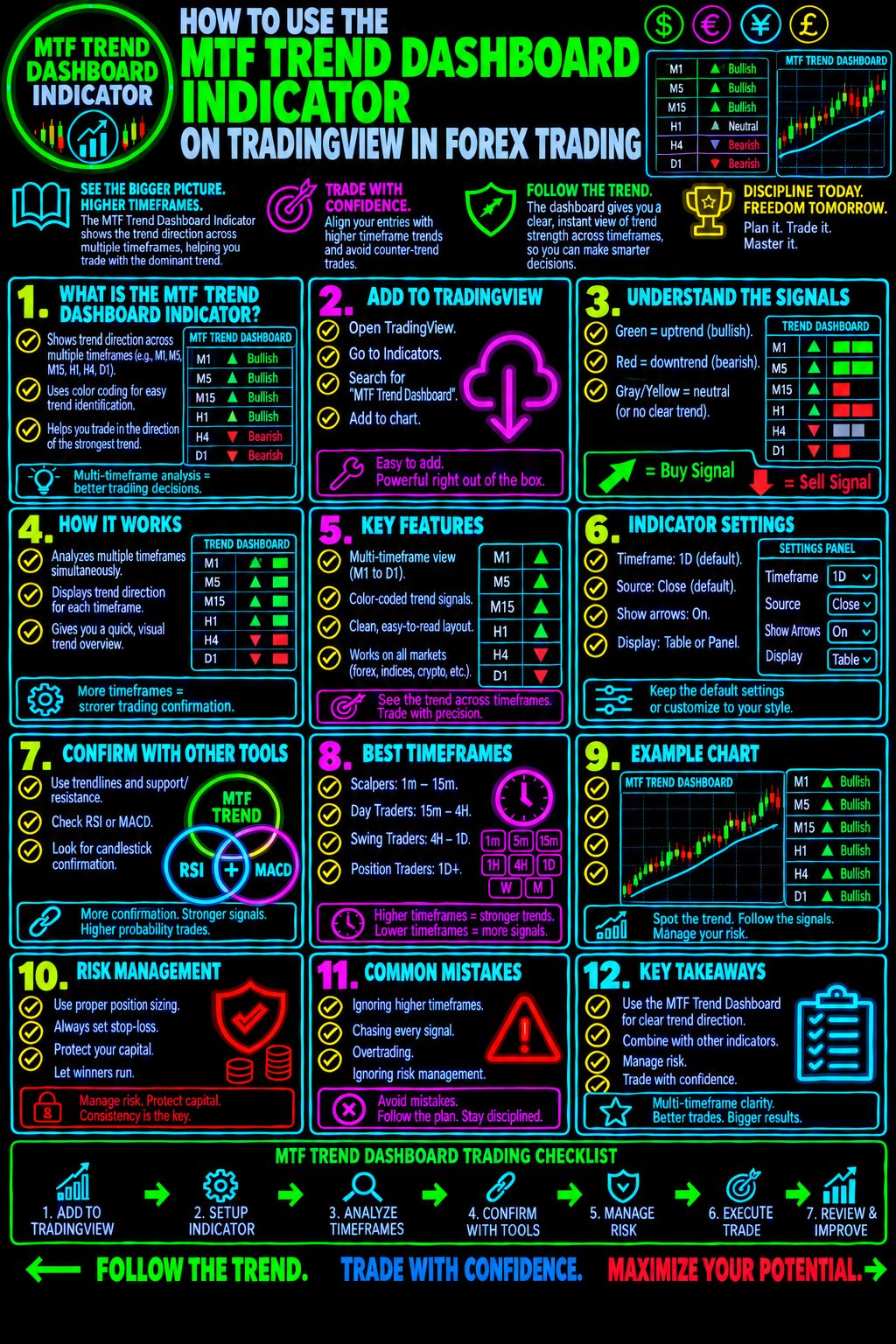
Example: Using the MTF Trend Dashboard on EURUSD
Imagine that you are analyzing EUR/USD and want to identify a potential buying opportunity.
Your dashboard displays the following hypothetical readings:
Timeframe Example reading Possible interpretation
Daily Bullish Broader direction favors buyers
4-hour Bullish Intermediate trend agrees
1-hour Bearish A pullback may be developing
15-minute Bullish Short-term buying pressure may be returning
These readings are illustrative only and are not live market data or a current EUR/USD forecast.
The daily and four-hour readings suggest that the broader trend is bullish. The bearish one-hour reading may indicate a pullback, while the bullish 15-minute reading could suggest that shorter-term momentum is recovering.
Would you buy immediately?
Not necessarily.
A disciplined trader would examine whether price is approaching a meaningful support area, whether the pullback is losing momentum, and whether a clear entry trigger has developed.
The trader would then define the stop-loss, identify a realistic target, and calculate the potential risk before entering.
If price fails to confirm the setup, the trader can wait for another opportunity.
The lesson is simple: use the dashboard to organize your analysis, then use price action and risk management to evaluate the trade.
Best Timeframes for Different Forex Trading Styles
The most appropriate timeframe combination depends on your trading method, available time, and tolerance for short-term market fluctuations.
Trading style Higher timeframe Setup timeframe Entry timeframe
Scalping 1-hour or 4-hour 5-minute or 15-minute 1-minute or 5-minute
Day trading 4-hour or 1-hour 15-minute 5-minute or 15-minute
Swing trading Daily 4-hour 1-hour or 4-hour
Position trading Weekly or daily Daily Daily or 4-hour
These combinations are examples, not rigid rules. You can adapt them to your strategy and the indicator's supported timeframes.
Lower timeframes generally produce more frequent price changes and can generate more noise. Higher timeframes often provide broader context but may be less suited to precise short-term entries.
The important point is to use a consistent timeframe structure rather than changing your analysis whenever a signal becomes inconvenient.
How to Combine the MTF Trend Dashboard with Other Trading Indicators
The MTF Trend Dashboard Indicator can be used alongside other tools, provided each tool serves a clear purpose.
Adding more indicators does not automatically improve trading performance. The goal is to obtain complementary information rather than repeatedly measure the same market condition.
Combine the Dashboard with Moving Averages
Moving averages can help identify trend direction and dynamic areas of potential support or resistance.
For example, you might use a higher-timeframe dashboard reading to establish directional bias and a moving average on your entry chart to evaluate a pullback.
Be aware that both tools may respond to the same underlying price trend. Agreement between them does not necessarily represent two independent confirmations.
Combine the Dashboard with RSI
The Relative Strength Index (RSI) measures momentum and can help identify changes in buying or selling pressure.
A trader might use the dashboard to establish trend direction and RSI to examine whether momentum supports the proposed setup.
However, overbought conditions do not automatically signal a sell, and oversold conditions do not automatically signal a buy. Strong trends can remain overbought or oversold for extended periods.
Combine the Dashboard with MACD
The Moving Average Convergence Divergence (MACD) indicator can help traders evaluate momentum and potential changes in trend behavior.
For example, a trader looking for a bullish setup might examine whether the higher-timeframe trend is positive and whether MACD provides supporting momentum evidence.
Neither tool should replace a clearly defined entry, stop-loss, and exit plan.
Explore our educational resources on Forex Technical Analysis to develop a more complete understanding of how technical indicators fit into a trading strategy.
Common Mistakes to Avoid When Using an MTF Trend Dashboard
Even a useful dashboard can lead to poor decisions when traders misunderstand its purpose.
1. Treating Every Bullish Reading as a Buy Signal
A bullish trend reading does not tell you whether the current price offers a good entry.
Price could be approaching resistance, extending far above a reasonable stop-loss location, or losing momentum.
Always evaluate the trading location and potential downside before entering.
2. Ignoring the Higher Timeframes
A trader who watches only the entry chart can mistake a short-term price movement for a broader trend reversal.
Checking higher timeframes helps put the current price movement into context.
3. Using Too Many Indicators
Loading your chart with numerous indicators can create conflicting signals and make decisions more difficult.
Choose a small number of tools that provide distinct information and test whether they improve your process.
4. Ignoring Market Structure
Indicator readings cannot replace the analysis of swing highs, swing lows, support, resistance, and price behavior.
A dashboard may indicate a bullish trend even when price is approaching a major resistance area where buying could be less attractive.
5. Forgetting Risk Management
A high-confidence-looking dashboard does not eliminate trading risk.
Forex trading involves substantial risk, particularly when leverage is used. Determine your position size and potential loss before entering any trade.
6. Failing to Test the Indicator
Before risking real money, observe how the indicator behaves across different currency pairs and market conditions.
Check whether its readings update during the candle, whether historical signals change, and how it behaves during ranging markets and major news events.
Use historical analysis and demo trading to evaluate your rules. Avoid assuming that attractive chart examples prove a strategy will be profitable.
How to Test the MTF Trend Dashboard Indicator
A structured testing process can help you determine whether the dashboard adds value to your trading decisions.
First, define your rules. Specify the timeframes you will use, what qualifies as a trend, which price-action conditions are required, and how you will enter and exit trades.
Second, test different market environments. Include trending markets, consolidations, sharp reversals, and periods of elevated volatility.
Third, record your results. Track your win rate, average winning trade, average losing trade, maximum drawdown, and results after estimated trading costs.
Fourth, compare the results. Evaluate your strategy with and without the dashboard to determine whether it provides useful additional information.
Finally, use forward testing. Apply the rules in a demo account or through appropriately sized, controlled testing before considering live implementation.
A strategy should be evaluated across a meaningful sample of trades. A handful of successful examples is not enough to establish an edge.
Is the MTF Trend Dashboard Indicator Suitable for Beginners?
A multi-timeframe trend dashboard may help beginners organize market information and understand how short-term price movements relate to broader trends.
It can also provide a practical introduction to the concept of top-down technical analysis.
However, beginners should learn what the indicator measures instead of treating its output as a trading instruction.
Before trading with it, make sure you understand:
- The difference between bullish, bearish, and ranging markets.
- How support and resistance influence potential trade locations.
- How to interpret basic candlestick formations.
- How to calculate position size and define risk.
- Why indicator signals can be delayed, conflicting, or misleading.
Develop these skills alongside your dashboard analysis, and use a demo account while you refine your trading rules.
Take Your Forex Trading Knowledge to the Next Level
Understanding market direction is only one part of becoming a more disciplined forex trader.
You also need a repeatable strategy, a clear understanding of price action, and a risk-management process that helps protect your trading capital.
Forex Trading Unlocked provides educational resources designed to help you develop these skills and make more informed trading decisions.
Start with the Free Forex Trading Starter Kit
Build a stronger foundation before adding more complexity to your charts.
The Free Forex Trading Starter Kit can help you begin organizing your forex education and developing a more structured approach to the markets.
Get started here: Explore Forex Trading Unlocked
Master High-Probability Candlestick Setups
Learn how to interpret candlestick formations in the context of market structure, trend direction, and key price levels.
Visit our High-Probability Japanese Candlestick Patterns Guide to strengthen your understanding of price action.
Improve Your Trading Risk Management
Even a well-planned trade can lose money. Understanding position sizing, stop-loss placement, and risk-to-reward calculations is essential to building a sustainable trading process.
Continue with our Forex Risk Management Resources and make risk control part of every trading decision.
Explore TradingView Charting Tools
TradingView provides charting capabilities that can help you analyze currency pairs, monitor price action, and evaluate technical indicators.
Explore TradingView to learn more about its charting tools and available features.
Frequently Asked Questions About the MTF Trend Dashboard Indicator
What does MTF mean in forex trading?
MTF stands for multi-timeframe. It refers to analyzing a currency pair across different chart intervals to understand the relationship between broader market direction and shorter-term price movements.
What does the MTF Trend Dashboard Indicator do?
It is designed to display trend information from multiple timeframes in one dashboard. The exact calculations, signals, and supported features depend on the specific indicator version.
Can the MTF Trend Dashboard Indicator generate buy and sell signals?
Some versions may include signals or alerts, while others primarily display trend conditions. Check the specific indicator's documentation. A trend reading alone should not be treated as a complete buy or sell instruction.
Which timeframes should I use?
Choose timeframes that match your trading style. Scalpers generally focus on shorter intervals, while swing traders often rely more heavily on hourly, four-hour, and daily charts. The most useful combination is one you can apply consistently.
Is the MTF Trend Dashboard Indicator profitable?
No indicator can guarantee profitability. Results depend on the underlying calculations, market conditions, entry and exit rules, trading costs, and risk management. Test the indicator as part of a complete strategy before using it with real money.
Can I use the MTF Trend Dashboard Indicator with other indicators?
Yes. You can combine it with tools such as moving averages, RSI, MACD, and price-action analysis. Choose complementary tools and test whether they improve your decisions rather than simply adding more signals.
Is the MTF Trend Dashboard Indicator available for free on TradingView?
Availability depends on the particular indicator. Some community indicators are free, while others may require access approval, a subscription, or payment. Check the indicator's TradingView listing for its current terms.
Final Thoughts: Use Multi-Timeframe Analysis to Trade with Greater Structure
The MTF Trend Dashboard Indicator on TradingView can make it easier to review market direction across multiple timeframes and recognize when short-term price movements agree with or conflict with the broader trend.
But the real value comes from how you use that information.
Establish the higher-timeframe context. Identify meaningful price levels. Wait for a clearly defined setup. Confirm your entry conditions. Calculate your risk before placing a trade.
Most importantly, remember that no dashboard can eliminate uncertainty or guarantee a winning trade.
Your goal is not to follow every signal. Your goal is to develop a repeatable trading process that helps you evaluate opportunities, manage risk, and make more disciplined decisions.
Continue building your knowledge with Forex Trading Unlocked, explore our forex education and technical analysis resources, and turn your chart analysis into a structured trading plan.
Disclaimer: This content is for educational and informational purposes only and does not constitute financial or investment advice. Forex and leveraged trading involve substantial risk, including the possible loss of your invested capital. Always conduct your own research and assess your risk tolerance before trading.
👉 “Get Instant Access (Check Your Email)”
💥 IMPORTANT: One Last Step Required
After you enter your email, check your inbox (or spam folder) for a confirmation email.
👉 Click the confirmation link so I can send you your free Forex training.
⚠️ If you don’t confirm, I can’t send you anything.
👉 “⚠️ Access expires if not confirmed within 24 hours minutes.”
👉 “Takes 10 seconds. Instant access after email confirmation.”